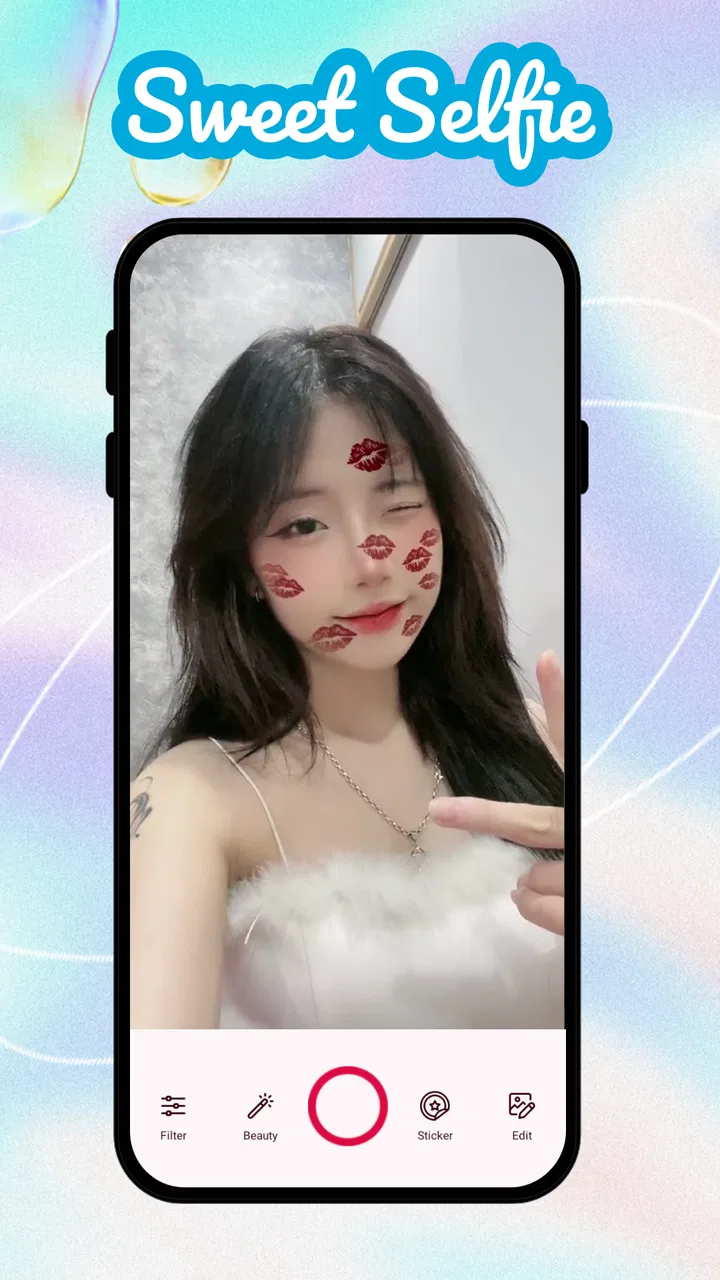
Sweet Camera Selfie
- 4.5
- Rating
- 1.00M
- Installs
- Free
- Price

 Analysis by App-foxy
Sweet Camera Selfie is the kind of beauty app I reach for when I want a more polished selfie without opening a full photo editor. It focuses on turning a quick front-camera shot into something softer and more playful through filters and effects, so the appeal is immediate: choose a look, frame your face, and decide whether the result feels natural enough to keep. I found it most useful for casual profile pictures, messages to friends, and quick social posts rather than serious portrait work.
It is a free beauty app from DictionaryAndTranslator, rated for Everyone. The app has built a sizeable audience, with over one million installs and an average score of 4.6 from around ten thousand ratings. That combination suggests it has found a clear audience among people who prefer simple selfie editing over a complicated collection of professional controls. The current version is 2.1.0, and it runs on Android 5.0 or later, which makes it accessible on many older devices as well as newer phones.
How I use Sweet Camera Selfie from the first shot to the finished picture
My usual workflow starts before I touch a filter. I face a window or another broad light source, clean the camera lens, and hold the phone slightly above eye level. That sounds basic, but it matters more here because beauty effects can make uneven lighting look artificial. A filter can soften the overall impression, but it cannot rescue a face covered in harsh shadows without making the result look noticeably processed.
You May Also Like

 Blood Strike: 2.5 Anniversary
Blood Strike’s Loadouts Turn Every Drop Into a Tactical Gamble
A close look at Blood Strike’s custom loadouts: how fast access to signature weapons reshapes its battle royale rhythm, rewards preparation, and narrows the gap between fights.

 Pandora - Music & Podcasts
Pandora’s Music Is Easy to Start, but Harder to Recover
Pandora’s strength is its low-effort path from a seed to a station. Its weak spot is how much confidence it asks you to place in connection, setup, and quiet recovery.

 8 Ball Pool
 Is Built on Rivalries, Rematches, and Routine
A close look at the rivalries, rematches, shared routines, and unanswered safety questions that turn a quick pool match into a persistent mobile community.

 Samsung Music
’s Quiet Strength Is Playing What You Already Own
Its reach comes less from spectacle than from dependable access to a personal library. That simplicity is both the app’s strongest retention engine and its ceiling.

 AccuWeather: Weather Radar
AccuWeather Review: A Quick, Clear Forecast for Everyday Decisions
For everyday plans, the best forecast is the one you can understand quickly. AccuWeather makes rain timing, radar, and local conditions easy to act on, with a few trade-offs.

 Hill Climb Racing
Why Hill Climb Racing Still Turns Crashes Into One More Run
A tiny car, a bumpy hill and one more upgrade: Hill Climb Racing keeps resurfacing because its simple chaos makes every near-miss feel personal.
More From Our News Desk
View All News


Once the camera view is ready, I try a few looks instead of accepting the first one. The app’s central idea is quick visual transformation, so comparing options side by side in the moment is more practical than taking a large batch of nearly identical photos and editing them later. I pay attention to the eyes, skin texture, and the edges of the face. If an effect changes all three at once, I prefer the version that keeps my features recognizable.
That is the first important habit I would recommend: judge the whole face, not just the most attractive part of the preview. A filter may make skin appear smooth while also flattening natural detail or changing the color of hair and clothing. Looking at the complete frame helps prevent the common “looks good in the preview, strange in the gallery” problem.
For an everyday example, imagine taking a quick selfie before sending a birthday message. I would use a bright, uncomplicated look, keep the framing close, and save one version with a modest effect rather than spending several minutes trying to create a dramatic portrait. For a profile image, I would take more time to check the background and crop, because a strong effect can distract from the face when the image is displayed small.
The app works best when I treat its effects as a finishing layer rather than a replacement for a good photograph. A relaxed expression, clean background, and steady phone position usually make a bigger difference than selecting the most intense visual treatment. This also gives me a repeatable result: the next time I need a selfie, I know where to stand and what kind of look to test first.
What to check before committing to a filter
I look at skin tones first. Some beauty effects are flattering under indoor lighting but too warm or too pale near a window. I also check whether the effect changes the apparent sharpness of the eyes. When the eyes become overly bright while the rest of the image remains subdued, the edit can feel less believable even if the face initially appears more polished.
Next, I examine the boundary between my face and the background. This is an easy place to notice aggressive processing. Loose hair, glasses, and the outline of the jaw can reveal whether an effect is being applied in a way that suits the image. If those edges look distracting, I switch to a gentler option or change the lighting before taking another shot.
I also avoid judging a preview only at full-screen size. I briefly imagine the picture as a small avatar or a compressed message image. Fine smoothing may disappear at that size, while a strong color cast remains. This is a useful distinction: the best effect for a large portrait is not always the best effect for a social profile or a quick chat.
Settings and choices worth checking
Sweet Camera Selfie is deliberately more approachable than a traditional editor, but that does not mean every choice should be automatic. I would spend a few minutes exploring the available camera and effect controls before relying on the app for an important picture. The goal is not to turn a quick selfie into a technical project; it is to learn which visual styles suit your face and lighting.
Start with the least dramatic option that gives you the improvement you want. Strong effects are tempting because the difference is obvious, but subtle changes tend to survive different screens and lighting conditions better. They also leave more room for cropping or adding text later without making the final image feel overloaded.
It is worth checking the preview after moving the phone, not just after changing the effect. A filter that looks balanced in one position may appear too intense when the camera is closer or the light comes from the side. I use a small test routine: keep the same expression, shift the phone slightly, and compare the result. This separates the effect itself from changes caused by framing.
Another practical check is whether the chosen look matches the purpose of the photograph. A playful effect can work well for a private message or a themed post, while a restrained treatment is usually better for a work-related profile or a picture that should remain useful for a long time. Sweet Camera Selfie gives me speed, but I still have to make that editorial decision myself.
Because the app is free to install, it is easy to try without committing money at the start. However, in-app purchases range from $0.99 to $99.99 per item, so I would pay attention to any purchase screen and avoid tapping through quickly. Free access makes experimentation convenient, but it does not mean every possible item or enhancement is included at no cost. I prefer to use the free workflow for several days before deciding whether an optional purchase has a real place in my routine.
Repeatable habits that make the process faster
Experienced use is less about finding a secret button and more about reducing unnecessary decisions. I keep a simple mental shortlist of three types of look: natural, bright, and playful. When I open the app, I test one from each group instead of trying everything. This makes the process faster and gives me a consistent way to choose without getting lost in endless previews.
I also take several expressions while keeping the phone in nearly the same position. The best result is often the one with the most relaxed face, not the one with the most powerful effect. If I change the pose, distance, lighting, and filter at the same time, I cannot tell what improved the image. Separating those variables is a small but surprisingly effective way to get better results.
For recurring needs, I use the same lighting setup. A window-facing position during the day gives me a dependable baseline, while a lamp placed slightly to one side can create a more dimensional look than overhead room lighting. Once I know how the app’s effects behave in that environment, I spend less time correcting color and more time choosing the right expression.
Another useful pattern is to decide the destination before taking the photo. If I need a square profile image, I leave enough space around my head for a later crop. If I am sending the image in a conversation, I can frame more closely. This prevents the common mistake of creating an attractive selfie that loses part of the face when resized.
I would not use every effect simply because it is available. A repeatable habit is to keep one dependable choice for ordinary days and reserve more noticeable styles for situations where the visual change is intentional. That approach makes the app feel like a practical camera rather than a random-effect generator.
Where the app is genuinely convenient
The strongest part of Sweet Camera Selfie is the short path from camera view to a finished-looking image. People who dislike moving between a camera, a retouching tool, and a separate effects editor will appreciate that concentrated workflow. It is especially suitable for casual users who want a cheerful beauty treatment without learning layers, masks, curves, or detailed color correction.
I can also see it helping users who take frequent informal pictures but do not want every image to look identical. Filters and effects provide variety while keeping the process approachable. A student preparing a new profile picture, a traveler sharing a quick update, or someone sending a playful selfie to family can all benefit from that speed.
The broad age rating also makes the app easy to consider for general household use, although I would still encourage younger users to ask before making purchases. The important point is that the interface concept is accessible: it is built around visual choices rather than specialist photography terminology.
Its large install base and strong average rating make it understandable why someone might try it before a more demanding editor. Still, popularity does not remove the need for personal testing. Beauty effects are subjective, and the same treatment can look gentle on one face and exaggerated on another. I would use the rating as a reason to explore the app, not as proof that every effect will suit me.
Limits that become clearer with more demanding photos
The simplicity that makes the app friendly also limits how far I can push an image. If I want precise control over individual areas, careful skin retouching, selective color work, or a detailed correction of the background, I would choose a more advanced photo editor. Sweet Camera Selfie is designed around quick transformation, not a full professional finishing process.
I also would not depend on it for a carefully planned portrait session. In that situation, I want control over lighting, focus, composition, and later editing. A dedicated camera app or a fuller editor is better when the photograph needs to remain flexible. This app is more convincing when speed and style matter more than exact control.
There is a creative trade-off as well. Effects can make several selfies feel visually related, but they can also encourage a uniform appearance. If every image uses heavy smoothing or the same color treatment, natural differences in expression and lighting disappear. I get better long-term results by alternating between a light treatment and an unembellished camera photo when authenticity matters.
Older devices may also deliver a different experience from newer phones because camera quality and processing ability vary widely. The app supports Android 5.0 and later, which is helpful for compatibility, but the operating-system requirement alone does not guarantee identical camera output on every handset. If previews feel slow or images look less clear than expected, I would first test the phone’s ordinary camera under the same lighting to see whether the difference comes from the device rather than the effect.
Privacy-conscious users should make their own comfort decision before taking personal images in any beauty camera. I would review the app’s permission prompts carefully and avoid granting access that does not seem necessary for the task. This is not a criticism unique to Sweet Camera Selfie; it is simply sensible behavior with any camera-based app.
How it compares with the usual alternatives
Compared with the standard phone camera, Sweet Camera Selfie is more immediate when I already know I want a beautified or playful result. The regular camera is usually the better starting point for maximum detail and a neutral file, especially if I plan to edit later. The app wins when I want the visual decision to happen during capture rather than after it.
Compared with a full photo editor, it is faster and less intimidating but much less precise. A professional-style editor gives me more control over selective adjustments and image cleanup, while this app keeps the number of decisions manageable. I would choose Sweet Camera Selfie for a quick personal image and the advanced alternative for a portrait that needs careful finishing.
Compared with social-media camera tools, the choice depends on what I want from the final picture. Social platforms are convenient when I am publishing immediately and want their built-in creative tools. A dedicated beauty camera is more useful when I want to prepare the image first or keep the result separate from a particular social network. For me, that separation is the main practical advantage.
The app’s free entry point also makes it a low-risk alternative to paid editing software, but the possible in-app charges mean I would not assume every option is permanently free. If I only need occasional filters, the free experience may be enough. If I need precise retouching or a predictable professional workflow, paying for a stronger editor may be better value than collecting optional effects here.
Who should try it, and who should skip it
I would recommend Sweet Camera Selfie to someone who wants quick, noticeable improvement with very little learning. It suits casual selfies, friendly messages, profile updates, and playful images where a polished look is more important than photographic neutrality. It is also a good fit for users who find large editing apps overwhelming.
I would suggest skipping it if your priority is manual control, natural unprocessed detail, or a complete portrait-production workflow. Photographers, creators who need consistent color across a series, and users who routinely remove objects or repair complex backgrounds will probably outgrow this style of app. A standard camera combined with a capable editor would give them more dependable control.
My most useful advice is to build a small personal workflow rather than chase every new effect. Use stable lighting, compare a restrained and a stronger treatment, check the edges of the face, and think about the final destination before saving. Those habits make the app more reliable and reduce the chance of ending up with a selfie that looks impressive only inside the preview.
My final view is that Sweet Camera Selfie succeeds as a fast beauty camera, not as a replacement for every kind of photo editor. I like the short learning curve and the way it turns a basic selfie into something more expressive without demanding technical knowledge. The main caution is to keep the effects under control and watch the purchase prompts, especially if the app becomes part of a younger user’s routine.
For my own use, I would keep it installed for spontaneous portraits and lighthearted updates. When I need a neutral image, detailed correction, or a carefully controlled final file, I would switch to the phone’s regular camera or a more advanced editor. That clear division of roles is where the app makes the most sense: it is a convenient first-stop beauty tool for quick results, provided I remain the one deciding how much enhancement is enough.
FAQs for Sweet Camera Selfie
01What features does Sweet Camera Selfie offer?
Sweet Camera Selfie includes a variety of features designed to enhance your selfies. It offers real-time beauty effects, a wide range of filters, and an extensive selection of stickers. Additionally, it provides tools for photo editing, such as brightness, contrast, and saturation adjustments, ensuring your photos look professional and polished.
02Is Sweet Camera Selfie free to use?
Yes, Sweet Camera Selfie is free to download and use. However, it does offer in-app purchases for additional features and content. These purchases might include premium filters, exclusive stickers, and advanced editing tools. Users can enjoy a comprehensive experience without these purchases, but the extras could enhance their creative options.
03Does Sweet Camera Selfie require an internet connection?
While Sweet Camera Selfie does not require an internet connection for basic functionality, such as taking photos and applying filters, some features may need connectivity. Accessing new stickers, updates, and certain in-app purchases will require an internet connection to download additional content and ensure the app runs smoothly.
04Is Sweet Camera Selfie compatible with all devices?
Sweet Camera Selfie is compatible with most Android and iOS devices. However, it's essential to check the specific system requirements on the app store to ensure your device is supported. Compatibility may vary based on your device's operating system version, so keeping your device updated is advisable for optimal performance.
05How does Sweet Camera Selfie protect user privacy?
Sweet Camera Selfie is committed to protecting user privacy. The app requests permissions relevant to its functionality, such as camera and storage access. It adheres to strict privacy policies to ensure user data is secure and not shared without consent. Users can review these policies within the app to understand data handling practices.
Pros
- User-friendly interface for easy navigation.
- Wide variety of filters and effects.
- Quick sharing to social media platforms.
- High-quality image outputs.
- Regular updates with new features.
Cons
- Contains in-app advertisements.
- Some features require premium purchase.
- Occasional app crashes reported.
- Large storage space required.
- Limited editing tools in free version.

Sweet Camera Selfie
Gallery